



AI is no longer just a helpful assistant. It is becoming the backbone of how modern teams collaborate and create. When your tools get smarter, your entire workday gets easier.
Microsoft rolls out new features every single month. Keeping up with these changes is important for IT admins and everyday business users alike. But you probably do not have time to read through endless technical release notes. You just want to know how these updates will help you finish your work faster.
That is exactly what we are going to cover. We will walk you through every major update from March 2026 and explain what it means practically for your organization. Let’s break down what changed and what your team should start using today.
Read Previous Update: Microsoft Copilot February 2026 Updates
Meeting Intelligence Gets a Cinematic Upgrade
Have you ever stared at a massive wall of text trying to figure out what happened in a missed meeting? The new Microsoft Copilot meeting video recap changes the game completely.
When you ask Copilot Chat to summarise a meeting, you now receive a video recap. Think of it like a sports highlight reel for your workday. It combines written takeaways with short, narrated video clips from the actual recording. This feature is currently available in English for meetings over 10 minutes long.
For remote teams and project managers, this is a massive win. It drastically reduces meeting fatigue. You can catch up on the tone and context of a discussion without watching an hour-long recording. Boom. Done in seconds.
The Microsoft 365 Copilot App Gets Smarter
The standalone app is becoming a powerhouse for daily tasks. The Microsoft 365 Copilot app updates 2026 bring three major improvements to how you work.
New Output Formats for Researcher
You can now convert your Copilot Researcher reports directly into a PowerPoint, a PDF, an infographic, or an audio overview. Say you are a sales rep looking at competitor data. You can turn that research into an instant pitch deck with a single click. You do not need to copy and paste anything.
Branded Footers
Admins can now add an organization-branded footer to the Copilot Chat screen. This small visual cue helps build trust. It reassures your team that they are using an approved, safe, and internally managed AI tool.
Revamped Copilot Notebooks
The new Notebooks experience is brilliant for knowledge workers. It brings your references, Copilot Pages content, and chats into one seamless side-by-side view. You also get a new Overview page and faster artifact creation. Managing complex, research-heavy projects just got a lot simpler.
AI in SharePoint
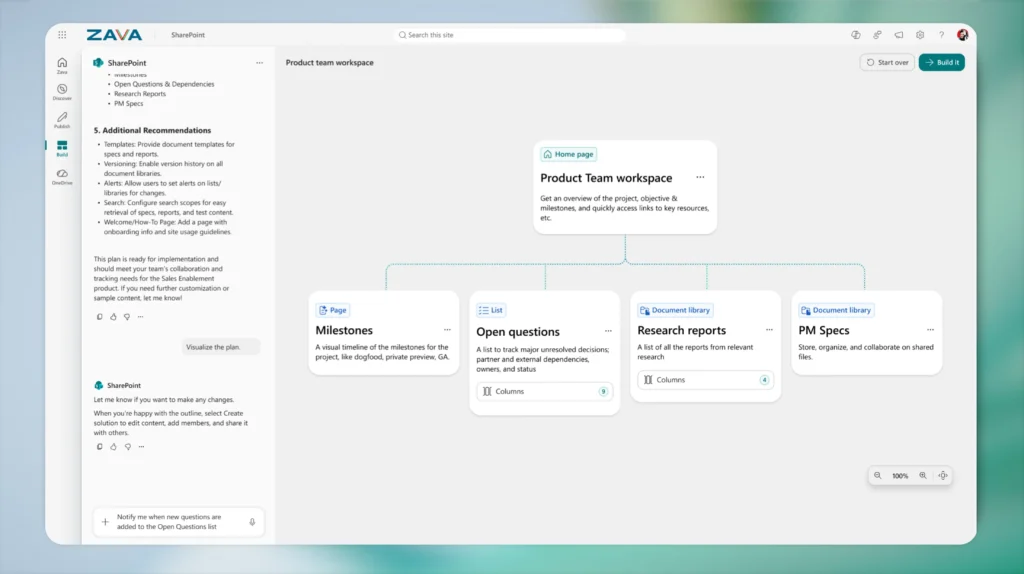
Managing company intranets used to require great technical skills. Not anymore. What Microsoft introduced as Knowledge Agent in September 2025 has now been rebranded as AI in SharePoint 2026.
This update brings agentic building and content intelligence directly into the platform. Your team can plan and build entire sites, document libraries, pages, and lists using simple natural language. Powered by Anthropic’s Claude model, AI in SharePoint automatically applies metadata and structures your information perfectly.
This rolls out to Public Preview in March and worldwide in May. It completely democratises SharePoint management for non-technical teams.
Audio Recaps Break Language Barriers
Global teams often struggle with time zones and language barriers. The Copilot Teams audio recap multilingual update is here to help.
Audio recap is now available in Chinese, French, German, Italian, Japanese, Portuguese, and Spanish, alongside English. This lets your multinational team catch up on meetings in their preferred language. It is a fantastic way to make enterprise meeting culture more inclusive and accessible.
Copilot in Excel Upgrades
Crunching numbers can be tedious when you have to constantly switch windows to check context. The new Copilot Excel 2026 features solve this exact problem.
Work IQ Automatic Context
Work IQ now automatically pulls in relevant context from your emails, meetings, chats, and files while you edit in Excel. You get more accurate, multi-step edits without having to manually reference other documents. Copilot knows what you are working on and helps you finish it.
Local Workbook Editing
Copilot can now make multi-step edits to Excel workbooks stored locally on your Windows or Mac device. You no longer have to store sensitive files in the cloud just to use AI. This is a game-changer for finance and operations teams handling highly confidential data.
Transparent Citations in Word
Trusting AI-generated text is much easier when you can verify the source. Thanks to the Copilot Word citations 2026 update, citations are now automatically displayed whenever Copilot pulls information from web content or internal Work IQ sources.
This gives legal, compliance, and research teams the verifiable sourcing they need. You can see exactly where the information came from, improving your confidence in document accuracy.
One-Click Format Standardization
We have all wasted hours trying to make a slide deck look consistent. The new Copilot PowerPoint formatting feature handles this instantly.
Using the “Edit with Copilot” button, you can now automatically standardize fonts, font sizes, and bullet styles across all your slides at once. It eliminates manual, slide-by-slide adjustments. This is perfect for consultants and agencies who need to manage brand-consistent client decks quickly. It is rolling out on the web in March, with desktop versions coming soon.
Admin Controls That Keep IT in Charge
Giving your team powerful AI tools requires equally powerful security. The Microsoft 365 Copilot admin controls 2026 updates to ensure IT stays fully in charge.
Purview DLP Safeguards
Microsoft Purview DLP now prevents sensitive information from being used in Copilot prompts for web searches. Admins can define strict policies. If a prompt contains financial records or national IDs, Copilot is restricted from responding or performing web searches. Your internal data stays completely safe.
Admin Center Upgrades
Admins get three great new tools this month:
- Designate SharePoint Online sites as authoritative content to boost their ranking in Copilot search results.
- Use the new High-Usage Users category to identify individuals driving high consumption, helping finance teams optimize software licences.
- Exclude specific domains from web grounding to meet compliance requirements.
Copilot Dashboard Metrics
Analysts can now track user satisfaction at scale by looking at thumbs-up and thumbs-down feedback over time. New metrics also let admins track intent-based scenarios across Outlook, Word, Excel, and PowerPoint.
Custom Copilot Tuning Templates
Every business works a little differently. The new Microsoft Copilot Tuning Agent Builder templates help large organisations create custom AI agents that match their exact workflows.
These templates are designed for drafting complex documents, validating text against company guidelines, and editing to match a distinct corporate writing style. This feature is available to enterprises with at least 5,000 Microsoft 365 Copilot licences. It rolls out to Frontier customers in April and worldwide in June.
The Empathy Technologies Perspective
All of these updates drive real business outcomes. Whether it is reducing meeting fatigue with video recaps or securing sensitive data with Purview DLP, Copilot is making work more productive and secure.
At Empathy Technologies, we know that deploying AI is only half the battle. Getting your team to actually use it is the real challenge. We specialise in Microsoft 365 deployments and Copilot adoption. From technical implementation to hands-on team training, we make sure your investment actually pays off. You don’t need to navigate this transition alone.
Make the Most of Your AI Tools
March 2026 brought some incredible updates to the Microsoft ecosystem. The cinematic Video Recap feature will change how you view missed meetings. AI in SharePoint will save your intranet managers hours of technical setup. And the local file editing in Excel finally gives finance teams the security they need to embrace AI.
Take a moment to assess which of these features will help your specific department the most. There is a lot of value waiting to be unlocked.
Ready to get the most out of Microsoft 365 Copilot? Contact Empathy Technologies today for a Copilot Readiness Assessment. You can also read our full Copilot adoption guide to learn more about preparing your team for the future of work.