


Microsoft just rolled out a major wave of updates to Microsoft 365 Copilot. If you use Outlook, Teams, Word, or PowerPoint for work, these changes will make your day easier.
February 2026 brings smarter AI agents, better search, enhanced collaboration tools, and new admin controls. Whether you’re a business user trying to save time or an IT leader managing Copilot across your organisation, this update has something for you.
Let’s break down what’s new, what it means, and how you can start using it.
Enhanced Copilot Chat & Search Capabilities
Copilot’s chat and search features just got a serious upgrade. These improvements help you find information faster and ask better follow-up questions.
Smarter Text Selection and Contextual Follow-Ups
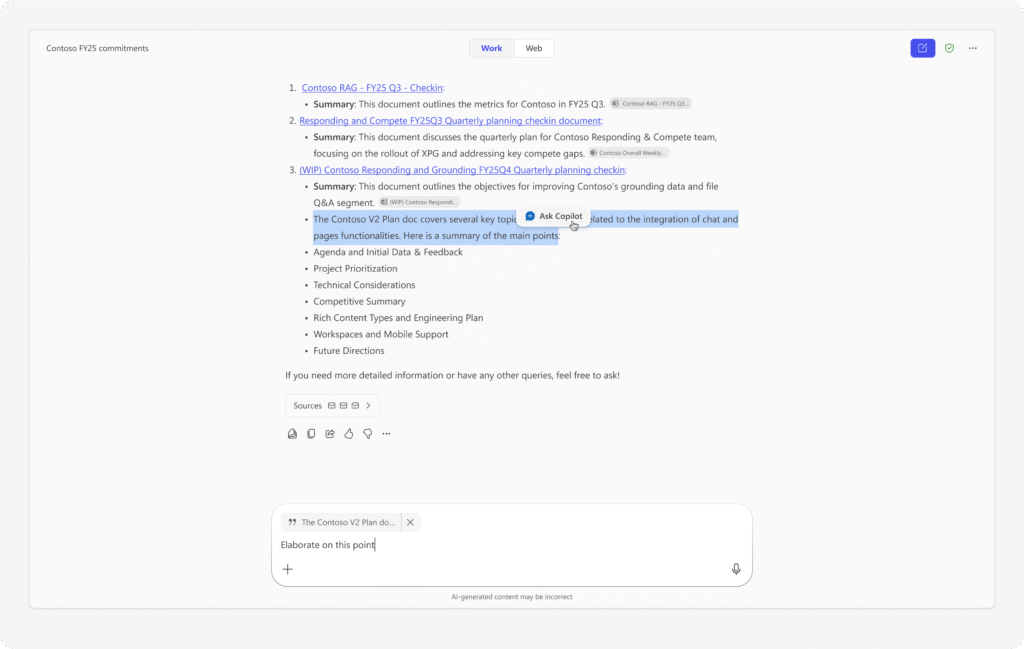
You can now highlight specific parts of a Copilot response and ask follow-up questions about just that section.
Here’s how it works:
- Copilot gives you an answer
- You select the text you want to explore further
- Click “Ask Copilot”
- Get a more focused response
This feature rolls out in March. It’s especially useful when you need to dig deeper into one part of a complex answer.
Deeper SharePoint and Email Grounding
Copilot now understands your SharePoint sites and emails better than before.
SharePoint integration:
- Type “/” in Copilot
- Select a SharePoint site or list
- Ask questions grounded in that specific content
Email grounding:
- When you use Copilot in Outlook, it automatically understands the context of your open email
- This works even without a Microsoft 365 Copilot licence
Both features launched in February and March, making it easier to get answers based on your organisation’s actual content.
Copilot Chat + Enterprise Search Integration
Search and chat now work together in a unified experience. You can explore search results while chatting with Copilot at the same time.
This means faster access to:
- Files
- Email attachments
- Conversations
- Documents
Rolling out in March, this update removes the friction between searching and asking questions.
AI Agents Become More Powerful and Context-Aware
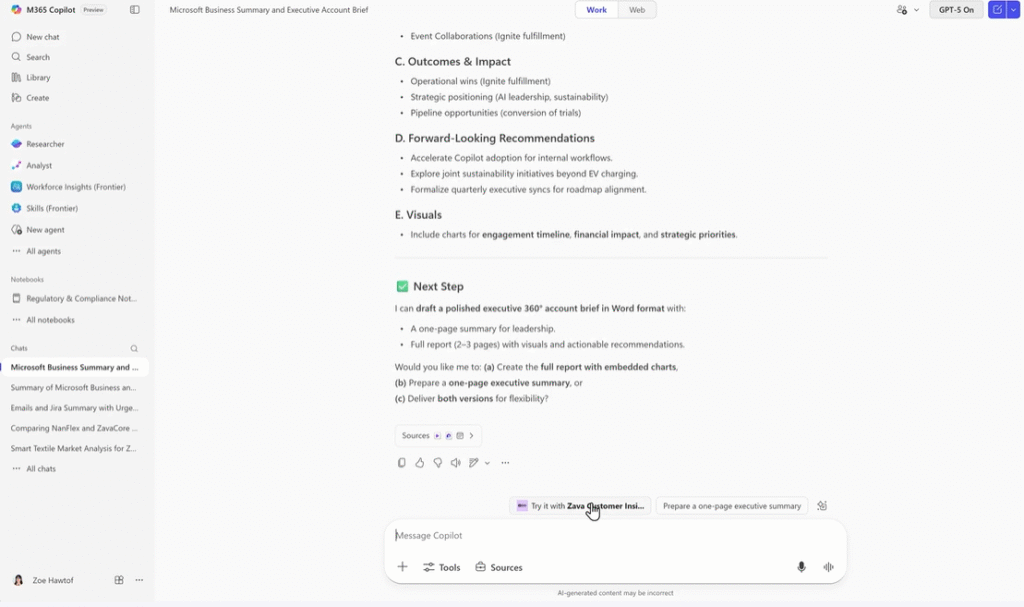
AI agents are becoming smarter teammates. They can now handle more complex tasks and work together to get things done.
Project Manager Agent for Task Planning
The new Project Manager Agent helps you organise and track work. Think of it as an AI project coordinator that:
- Breaks down projects into manageable tasks
- Suggests workflows
- Helps you stay organised
This agent enters Public Preview in March and rolls out worldwide in April.
Multi-Agent Coordination & Recommendations
Copilot now suggests which agents can help you based on what you’re working on. Even better, agents can work together on complex tasks.
Example:
- You’re planning an event
- Copilot recommends the Project Manager Agent
- That agent calls another agent to handle scheduling
- Both work together to complete the task
This coordination rolls out in March.
Custom Agent Access Across Microsoft 365
If your organisation builds custom agents using Copilot Studio, you can now access them directly in Outlook. This makes it easier to use AI tools tailored to your specific business needs.
Rolling out in March.
Read Also: Microsoft 365 Copilot Updates
Copilot in Collaboration Tools — Smarter Meetings & Communication
Meetings and team communication got several important upgrades this month.
Enhanced Agents in Microsoft Teams
Teams communities now have AI agents that turn conversations into shared knowledge. The agent:
- Reviews unanswered questions
- Drafts suggested responses
- Uses existing discussions and SharePoint content
This feature entered Public Preview in February and rolls out worldwide in April.
Improved Meeting Recap & Visual Summaries
Meeting recaps now include the visuals that were shown during your meeting. You’ll see:
- Slides that were presented
- Documents that were shared
- Whiteboards that were used
You can also customise recap templates to match how your team works. Both features rolled out in February.
Intelligent Scheduling & Meeting Prep in Microsoft Outlook
Copilot can now schedule meetings for you by:
- Analysing everyone’s availability
- Recommending the best time slots
- Scheduling directly from an email thread
Meeting preparation features include:
- Real-time insights
- Context summaries
- Relevant documents
- Meeting time analytics
These features rolled out in February for new Outlook and March for classic Outlook.
AI-Powered Content Creation Across Microsoft 365 Apps
Creating content in Word and PowerPoint just got more intuitive.
Default Editing with Copilot in Microsoft Word
When you prompt Copilot on a blank Word document, it now edits directly in your document by default. You can:
- See changes in real-time
- Review all suggestions
- Reverse any edits you don’t want
This creates a smoother workflow where you stay focused on writing instead of switching between chat and editing modes.
Started rolling out in February.
Agentic Presentation Creation in Microsoft PowerPoint
PowerPoint on the Web now lets you create and refine presentations through natural conversation.
You can:
- Ask Copilot to create slides about a specific topic
- Request edits to existing slides
- Upload brand guidelines to create brand kits
- Pull insights from meetings or emails
This agentic approach means PowerPoint understands context and makes smarter suggestions.
Started rolling out to the Web in February.
Copilot Agents in Files & Workflow Contexts
Your files and documents now have their own AI assistance.
Intelligent Agents Inside Microsoft OneDrive
OneDrive now has agents that understand the full context of your work. They help you:
- Find relevant documents faster
- Get answers based on folder content
- Stay organised
Rolled out in February.
Expanded File Search & Attachment Intelligence
You can now search for email attachments directly through Copilot. Results appear when you:
- Use full search
- Select Outlook filters
- Select SharePoint filters
This makes it much easier to find that one attachment from weeks ago.
Rolled out in February.
IT Admin Enhancements — Governance, Analytics & Security
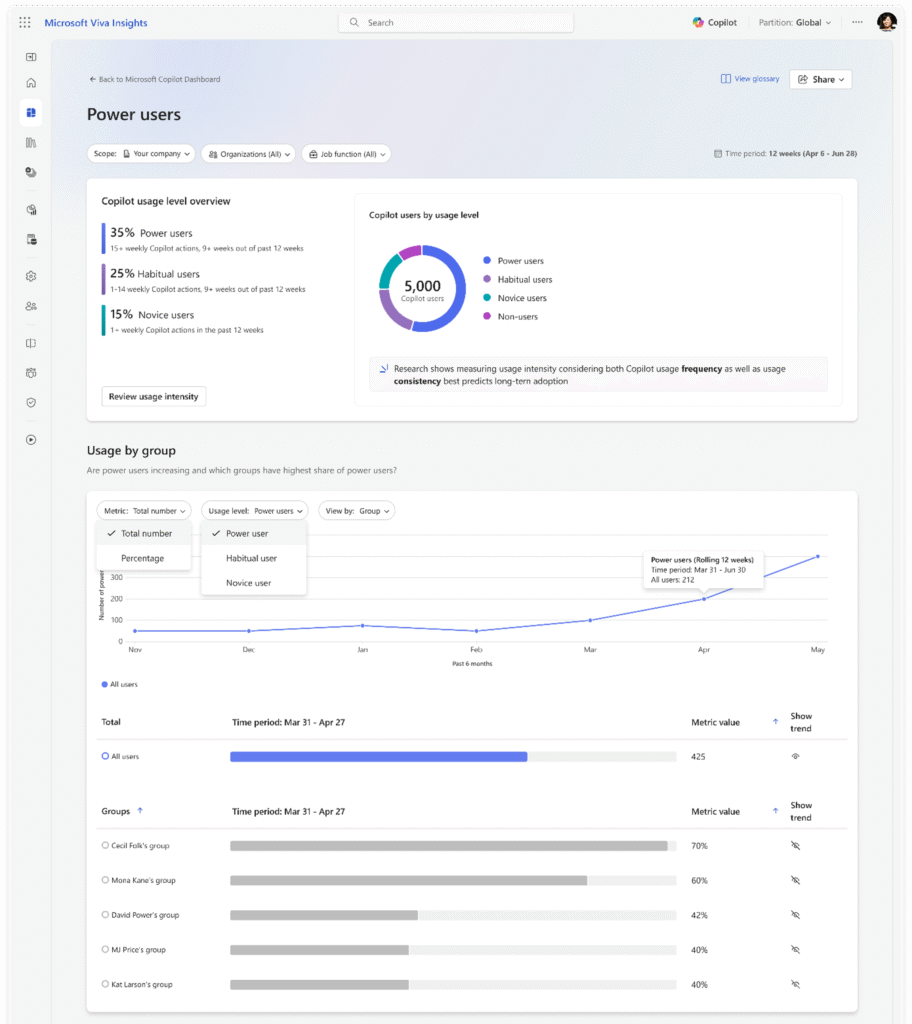
IT leaders get new tools for managing Copilot across their organisation.
Copilot Dashboard Improvements
Admins can now:
- Identify power users in the Power User Report
- See intelligent summaries of adoption patterns
- Target enablement efforts more effectively
Rolling out in March.
Licence Justification & Deployment Readiness
Licence justification:
Users can explain why they need a Copilot licence when requesting one. This helps admins make informed decisions.
Readiness page:
The Microsoft 365 admin centre now has a dedicated Copilot readiness page that guides you through configuration and rollout.
Both features roll out in March.
Federated Connectors & Usage Analytics
Federated connectors:
Now available in Public Preview by default across all tenants. They let Copilot access external data sources.
Connector Usage Report:
Shows how connectors enhance Copilot experiences across your organisation.
Rolled out in February, with analytics coming in March.
AI Agent Security with Microsoft Defender
Microsoft Defender now provides:
- Risk-based AI agent inventory
- SOC visibility for all agents
- Governance controls
This helps IT teams monitor and secure AI usage across the organisation.
What’s Rolling Out Next — Preview & Upcoming Features
Public Preview & Global Rollout Timeline
| Feature | Preview | Worldwide |
|---|---|---|
| Project Manager Agent | March 2026 | April 2026 |
| Agents in Teams communities | February 2026 | April 2026 |
| Copilot readiness page | February 2026 | March 2026 |
| Text selection follow-ups | – | March 2026 |
| SharePoint grounding | – | March 2026 |
Most features roll out gradually. Check your Microsoft 365 admin centre for exact availability in your region.
Future of Agentic AI in Microsoft 365
Microsoft is moving towards more autonomous AI that:
- Anticipates your needs
- Coordinates between multiple agents
- Handles complex tasks with minimal input
- Learns from your organisation’s patterns
The February updates show where Microsoft is heading. Copilot is evolving from a helpful assistant into an active collaborator.
Business Impact — Why February 2026 Updates Matter
These updates deliver real benefits:
Increased productivity:
- Less time searching for information
- Faster document creation
- Smarter meeting preparation
Better knowledge retrieval:
- Deeper understanding of SharePoint content
- Email context awareness
- Improved attachment search
Enhanced security:
- Better governance controls
- Usage analytics
- AI agent monitoring
Stronger collaboration:
- Smarter meeting recaps
- Teams community knowledge
- Multi-agent coordination
Getting the Most from These Updates
February 2026 marks a significant step towards agent-first productivity. Copilot is no longer just an assistant—it’s becoming an autonomous collaborator that understands context and takes action.
If you’re a business user, start exploring the new chat and search features. Try the updated Word and PowerPoint experiences. See how meeting recaps now capture visual content.
If you’re an IT leader, review the new admin tools. Check out the readiness page. Evaluate how federated connectors might benefit your organisation. Look at the Power User Report to identify champions who can help drive adoption.
The shift towards agentic AI is happening now. Organisations that understand these tools and develop good adoption strategies will have a clear advantage.
Start small. Pick one new feature and try it this week. Then build from there.