






We’ve all had those days. You’re drowning in emails, three different meetings ran overtime, and that report you promised by 5 PM is still a blank page. For a long time, technology just gave us faster ways to do these tasks—but we still had to do them.
That dynamic is shifting. The latest updates to Microsoft 365 Copilot arriving in November and December 2025 aren’t just about faster spell-checking or prettier PowerPoint slides. We are witnessing a fundamental change from Copilot being a helpful “assistant” to a proactive “work partner.”
If you are an IT leader, a business user, or just someone trying to claw back an hour in their day, these updates matter.
At Empathy Technologies, we believe that how mature your organisation is with Copilot is quickly becoming a major competitive advantage. Let’s break down what’s new and, more importantly, why you should care.
Quick Snapshot: Microsoft 365 Copilot Highlights
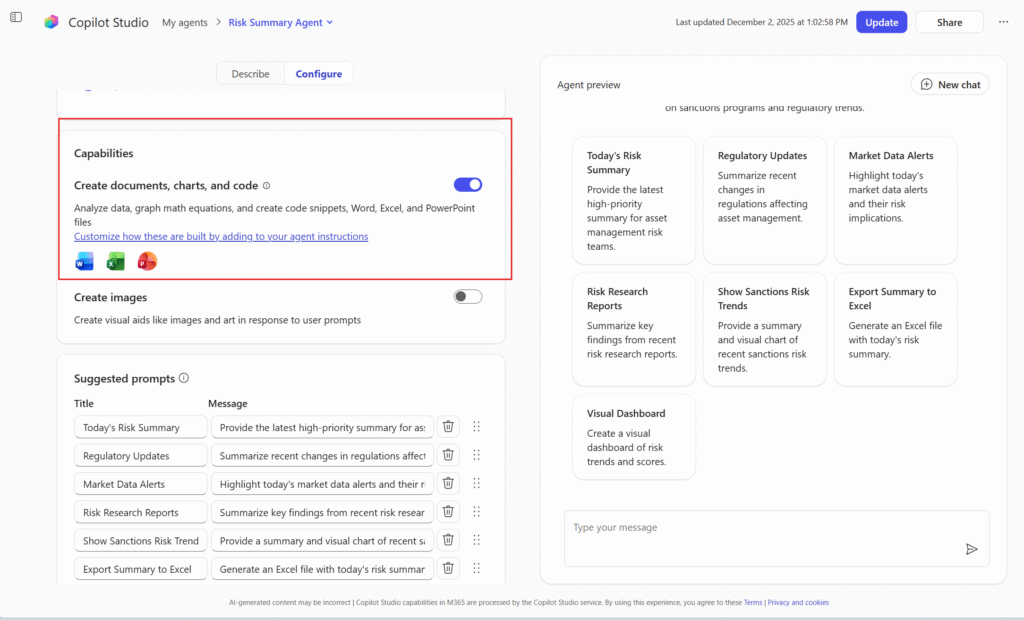
If you’re short on time, here is what you need to know about the latest rollout:
- Smarter Memory: Copilot now remembers context from past conversations (Work IQ), so you don’t have to repeat yourself.
- Agentic Actions: It can handle multi-step workflows, like “create a plan and assign tasks.”
- Deeper Integration: Unified experiences across Teams, Outlook, Word, and Excel.
- Admin Power: New dashboards for usage, adoption, and security governance.
- Real Productivity: Updates focus on finishing end-to-end workflows, not just generating text.
What’s New in Microsoft 365 Copilot
Copilot Is Becoming More Agentic
This is the biggest shift we’re seeing. Previously, you asked Copilot a question, and it gave an answer. Now, it can handle multi-step tasks. It maintains context across apps to suggest next actions automatically.
Think of it like this: instead of just summarizing a meeting, Copilot can now summarize the meeting, update the relevant project document, and notify the team—all in one flow. This “Agentic AI” approach allows for genuine automation and scale.
Copilot in Teams: Smarter Meetings
We all want to save time and reduce stress, and the new updates to Teams help tackle meeting fatigue head-on.
- Facilitator Role: It recognizes agendas shared in chat and creates a live progress tracker.
- Action Tracking: It captures tasks mentioned during the call and assigns them instantly.
- Unified Experience: The Copilot experience is now consistent across chats, channels, and meetings.
Copilot in Outlook: Inbox Intelligence
It’s not just a tool; it’s like a teammate who understands your inbox. Copilot can now better analyze conversation history to suggest relevant follow-ups. It prioritises emails based on intent and context rather than just showing you the newest message first. This means fewer missed opportunities and smarter calendar optimisation.
Copilot in Word: Vibe Writing
The new Agent Mode in Word turns document creation into an interactive experience. It’s fantastic for compliance and documentation teams handling policies, reports, or SOPs. You can tell it to “summarize customer feedback and highlight trends,” and it manages the heavy lifting—finding sources, drafting content, and matching your tone.
Copilot in Excel: Analysis Beyond Formulas
Excel updates are finally moving beyond simple “help.”
- Formula Completion: Type “=” and Copilot proactively suggests the formula you need based on your headers.
- Agent Mode: It plans and executes multi-step analysis tasks, like reshaping tables and generating charts. It offers real analytics value, ensuring a cleaner handoff to Power BI.
New Admin, Security & Governance Enhancements
For the IT leaders out there, this is where Copilot becomes safer to scale.
- Better Visibility: New dashboards allow you to export data to CSV for deeper analysis of adoption patterns.
- Security: Microsoft Purview unified audit logs now include agent-related activities.
- Governance: Baseline security modes ensure you are aligned with compliance policies.
Real Business Impact
What do these updates actually change for your daily grind?
- Productivity: Faster document creation and fewer manual follow-ups mean less context switching.
- Decision Making: Copilot surfaces insights, not just summaries, reducing dependency on manual reporting.
- Higher ROI: You get more value from your existing Microsoft 365 licenses without adding expensive new tools.
Copilot vs. Traditional Automation
You might be wondering, “How is this different from Power Automate?” The difference is the interface. Copilot acts as the conversational layer for automation. Instead of building rigid, rule-based workflows, you are collaborating with AI to execute tasks dynamically.
Who Benefits Most?
- Business Users: Less admin work, more focus.
- Managers: Better visibility into project status via “Facilitator.”
- IT Admins: Stronger governance and adoption tracking.
Looking Ahead to 2026
Looking ahead, we expect 2026 to bring even deeper “Agent” capabilities, where Copilot orchestrates tasks across apps without you needing to prompt every step. Expect voice-first interactions and tighter convergence with the Power Platform.
Read This: Top 5 AI Agent Use Cases: You Need to Know in 2025
How Empathy Technologies Helps
Adopting AI isn’t just about switching it on. At Empathy Technologies, we help you maximise Copilot value by:
- Building a readiness and adoption strategy.
- Mapping use cases by department.
- Aligning governance and security.
- Training teams to work with AI, not around it.
- Measuring real ROI.
FAQ – Microsoft 365 Copilot Nov–Dec 2025 Updates
What is the biggest Copilot update?
The shift to “Agentic AI,” allowing Copilot to perform multi-step tasks across apps.
Is Copilot becoming an AI agent?
Yes, features like Agent Mode in Word and Excel allow it to plan and execute tasks, not just chat.
Do these updates affect data security?
Yes, positively. New Purview integrations and audit logs provide better visibility into AI usage.
Who should enable Copilot now?
Organisations looking to reduce administrative drag and improve knowledge worker productivity.
Copilot Is No Longer Optional
Copilot is evolving from a simple assistant into a robust collaborator. These late-2025 updates mark a turning point. Businesses that adapt now will lead the pack in 2026.
👉 Talk to Empathy Technologies to turn Microsoft 365 Copilot into a real productivity engine.
I appreciate you sharing this blog post. Thanks Again. Cool.
You’re so awesome! I don’t believe I have read a single thing like that before. So great to find someone with some original thoughts on this topic. Really.. thank you for starting this up. This website is something that is needed on the internet, someone with a little originality!
Permalink